# Watching Amazon prime Movies
**URL:** https://community.w2g.tv/t/watching-amazon-prime-movies/58160
**Category:** Help
**Created:** [August 29, 2019, 5:02pm UTC](https://community.w2g.tv/t/watching-amazon-prime-movies/58160 "2019-08-29T17:02:38Z")
**Posts on this page:** 20
**Page:** 1
### Author:  [@raphael.ernst.raphae](https://community.w2g.tv/u/raphael.ernst.raphae)
#### Post date: [August 29, 2019, 5:02pm UTC](https://community.w2g.tv/t/watching-amazon-prime-movies/58160/1 "2019-08-29T17:02:38Z")
I am in desperate need of help/advice. I Want to watch a movie from Amazon prime on here but I can´t get it to work. Does it even work? What is up with the link video option if it only works for you and not the other people?
---
### Author:  [@user\_95f53b7185f71fb](https://community.w2g.tv/u/user_95f53b7185f71fb)
#### Post date: [August 29, 2019, 5:10pm UTC](https://community.w2g.tv/t/watching-amazon-prime-movies/58160/2 "2019-08-29T17:10:19Z")
When you use the W2gSync feature, the video opens in a separate window and is kept in sync with everyone else in the room. The Link Video option just mirrors the video into the player within the room so that it’s more convenient to watch and chat at the same time. Hope that helps!
---
### Author:  [@raphael.ernst.raphae](https://community.w2g.tv/u/raphael.ernst.raphae)
#### Post date: [August 29, 2019, 5:36pm UTC](https://community.w2g.tv/t/watching-amazon-prime-movies/58160/3 "2019-08-29T17:36:06Z")
Wow thanks for the quick reply. I am still completely confused. First I have to pick the W2gSync option right and the copy in the link of the prime video i wanna watch. After that i´m lost. If its not too much can you please give me a set by step description on how to do it.
Many thanks!
---
### Author:  [@user\_95f53b7185f71fb](https://community.w2g.tv/u/user_95f53b7185f71fb)
#### Post date: [August 29, 2019, 6:37pm UTC](https://community.w2g.tv/t/watching-amazon-prime-movies/58160/4 "2019-08-29T18:37:00Z")
You can actually skip the “pick W2gSync” option part since this is auto selected when you paste a link that can not be played by any other player.
- Paste the link into the search bar
- Select the displayed item from the search results
- Install the browser extension if not already installed
- Click on “Open” in the player
- Make sure the video plays in the window that opens up
- Optionally: Use Link Video to mirror the video from the external window to the player on Watch2Gether.
---
### Author:  [@user\_023b004ad9533aa](https://community.w2g.tv/u/user_023b004ad9533aa)
#### Post date: [August 30, 2019, 2:26am UTC](https://community.w2g.tv/t/watching-amazon-prime-movies/58160/5 "2019-08-30T02:26:51Z")
do the other people have to get the extentoion and do they have to have chrome. the extention is for cherome only correct?
---
### Author:  [@user\_95f53b7185f71fb](https://community.w2g.tv/u/user_95f53b7185f71fb)
#### Post date: [August 30, 2019, 5:39am UTC](https://community.w2g.tv/t/watching-amazon-prime-movies/58160/6 "2019-08-30T05:39:15Z")
@alansemailuk everyone need the extension when W2gSync is used in a room. It’s available for Chrome and Firefox.
---
### Author:  [@raphael.ernst.raphae](https://community.w2g.tv/u/raphael.ernst.raphae)
#### Post date: [August 30, 2019, 1:16pm UTC](https://community.w2g.tv/t/watching-amazon-prime-movies/58160/7 "2019-08-30T13:16:57Z")
> [@florian](#):
>
> - Make s
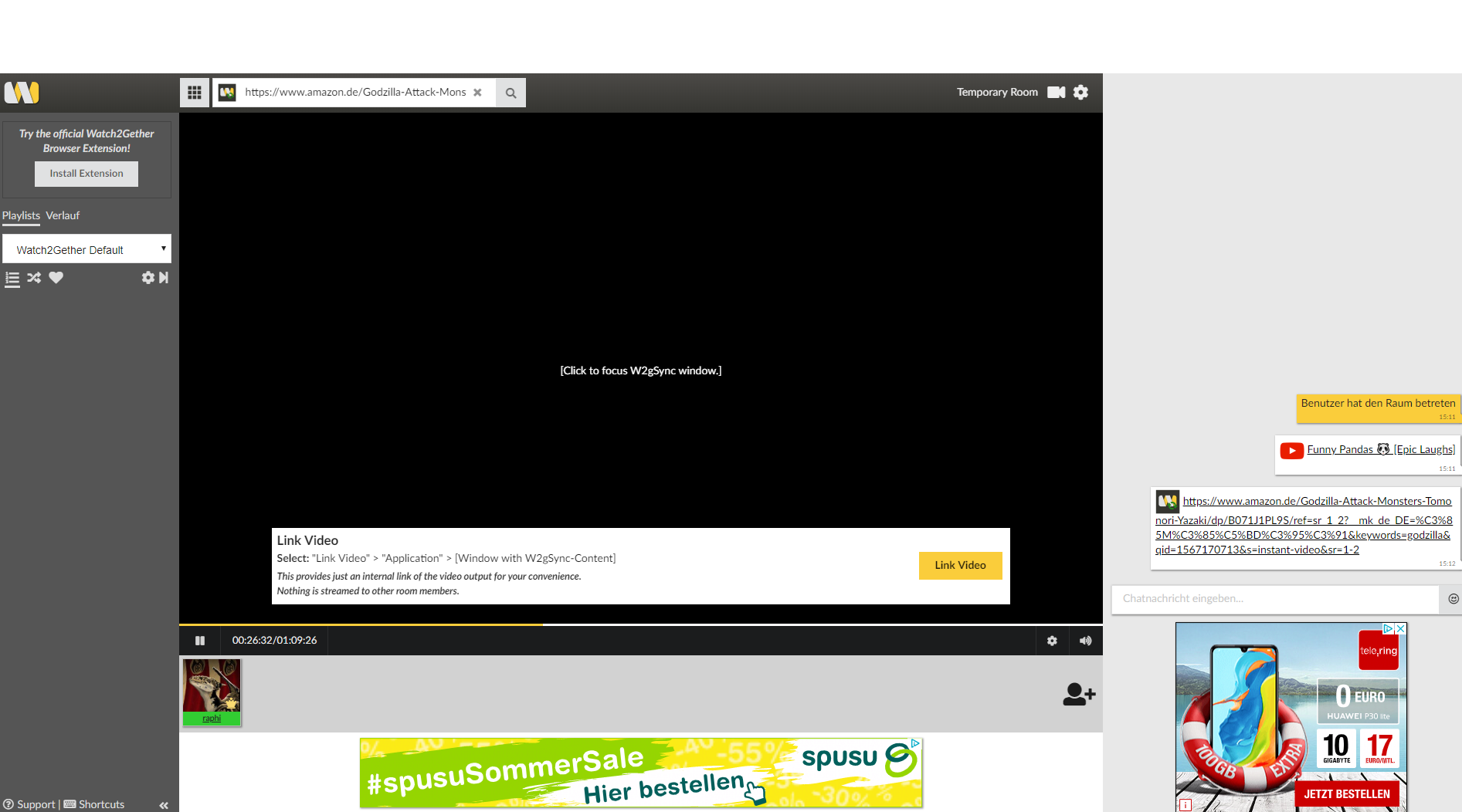
When i follow your instructions I end up with a backscreen where teh video should be playing and the movie running on a seperate Watch2Gether window.I followed every step.
---
### Author:  [@user\_95f53b7185f71fb](https://community.w2g.tv/u/user_95f53b7185f71fb)
#### Post date: [August 30, 2019, 6:03pm UTC](https://community.w2g.tv/t/watching-amazon-prime-movies/58160/8 "2019-08-30T18:03:40Z")
The video plays in a separate window, that’s a technical requirement. You can click on Link Video to mirror the video onto the player in your room.
---
### Author:  [@raphael.ernst.raphae](https://community.w2g.tv/u/raphael.ernst.raphae)
#### Post date: [August 30, 2019, 6:20pm UTC](https://community.w2g.tv/t/watching-amazon-prime-movies/58160/9 "2019-08-30T18:20:03Z")
So it should be working for other people if this screen shows and its palying in the extra window?
---
### Author:  [@user\_95f53b7185f71fb](https://community.w2g.tv/u/user_95f53b7185f71fb)
#### Post date: [August 30, 2019, 7:02pm UTC](https://community.w2g.tv/t/watching-amazon-prime-movies/58160/10 "2019-08-30T19:02:28Z")
Yes, but they need to install the extension as well. Watch2Gether is not a screen sharing solution. Instead every user opens the video and Watch2Gether makes sure it’s in sync.
---
### Author:  [@raphael.ernst.raphae](https://community.w2g.tv/u/raphael.ernst.raphae)
#### Post date: [August 30, 2019, 7:16pm UTC](https://community.w2g.tv/t/watching-amazon-prime-movies/58160/11 "2019-08-30T19:16:39Z")
So the two other people do also need to be logged in and have the movie ready to start in amazon prime (in the watch2gether window that opens up?
---
### Author:  [@raphael.ernst.raphae](https://community.w2g.tv/u/raphael.ernst.raphae)
#### Post date: [August 31, 2019, 1:54pm UTC](https://community.w2g.tv/t/watching-amazon-prime-movies/58160/13 "2019-08-31T13:54:31Z")
What exactly are you talking about?
---
### Author:  [@mondrail](https://community.w2g.tv/u/mondrail)
#### Post date: [August 31, 2019, 5:31pm UTC](https://community.w2g.tv/t/watching-amazon-prime-movies/58160/14 "2019-08-31T17:31:31Z")
I did what he said. Don’t know why it didn’t work for you. Sorry, man.
---
### Author:  [@raphael.ernst.raphae](https://community.w2g.tv/u/raphael.ernst.raphae)
#### Post date: [August 31, 2019, 5:43pm UTC](https://community.w2g.tv/t/watching-amazon-prime-movies/58160/15 "2019-08-31T17:43:07Z")
Did the people you were watching with do anything besides joining your room?
---
### Author:  [@user\_95f53b7185f71fb](https://community.w2g.tv/u/user_95f53b7185f71fb)
#### Post date: [August 31, 2019, 5:44pm UTC](https://community.w2g.tv/t/watching-amazon-prime-movies/58160/16 "2019-08-31T17:44:18Z")
@raphael.ernst.raphae yes they need to be logged into their accounts. The video will be chosen automatically depending on the link a user has selected to be played.
---
### Author:  [@mondrail](https://community.w2g.tv/u/mondrail)
#### Post date: [August 31, 2019, 5:46pm UTC](https://community.w2g.tv/t/watching-amazon-prime-movies/58160/17 "2019-08-31T17:46:37Z")
We all had our accounts signed in and that was it. I haven’t used it much since then.
For my group we use this site mostly for youtube and when my sketchy friends are around (I did convince them to install the extension, but they love not needing an account).
For regular viewing, we use twoseven.
---
### Author:  [@user\_023b004ad9533aa](https://community.w2g.tv/u/user_023b004ad9533aa)
#### Post date: [August 31, 2019, 6:15pm UTC](https://community.w2g.tv/t/watching-amazon-prime-movies/58160/18 "2019-08-31T18:15:00Z")
the window that pops out I understand. But when we press on this pop out window it just creates an advert on and the page we want to watch keeps going to another tab which is not linked to the watch2gether screen
---
### Author:  [@raphael.ernst.raphae](https://community.w2g.tv/u/raphael.ernst.raphae)
#### Post date: [August 31, 2019, 6:16pm UTC](https://community.w2g.tv/t/watching-amazon-prime-movies/58160/19 "2019-08-31T18:16:11Z")
Do they need to have bought the film thats I want to watch with them?
---
### Author:  [@mondrail](https://community.w2g.tv/u/mondrail)
#### Post date: [August 31, 2019, 6:21pm UTC](https://community.w2g.tv/t/watching-amazon-prime-movies/58160/20 "2019-08-31T18:21:51Z")
We just watched the videos that were included with Prime, I remember that for sure. If they don’t own it and you do, you can’t watch together.
---
### Author:  [@user\_d2bd7763cee9f5a](https://community.w2g.tv/u/user_d2bd7763cee9f5a)
#### Post date: [April 16, 2020, 1:32pm UTC](https://community.w2g.tv/t/watching-amazon-prime-movies/58160/21 "2020-04-16T13:32:20Z")
Followed the instructions exactly. But the other users couldnt see the video
[Next page](https://community.w2g.tv/t/watching-amazon-prime-movies/58160.md?page=2)